Tuesday, March 12, 2013
how To Create One-Click Shutdown and Reboot Shortcuts
First, create a shortcut on your desktop by right-clicking on the desktop, choosing New, and then choosing Shortcut. The Create Shortcut Wizard appears. In the box asking for the location of the shortcut, type shutdown. After you create the shortcut, double-clicking on it will shut down your PC.
But you can do much more with a shutdown shortcut than merely shut down your PC. You can add any combination of several switches to do extra duty, like this:
shutdown -r -t 01 -c "Rebooting your PC"
Double-clicking on that shortcut will reboot your PC after a one-second delay and display the message "Rebooting your PC." The shutdown command includes a variety of switches you can use to customize it. Table 1-3 lists all of them and describes their use.
I use this technique to create two shutdown shortcuts on my desktop—one for turning off my PC, and one for rebooting. Here are the ones I use:
shutdown -s -t 03 -c "Bye Bye m8!"
shutdown -r -t 03 -c "Ill be back m8 ;)!"
Switch
What it does
-s
Shuts down the PC.
-l
Logs off the current user.
-t nn
Indicates the duration of delay, in seconds, before performing the action.
-c "messagetext"
Displays a message in the System Shutdown window. A maximum of 127 characters can be used. The message must be enclosed in quotation marks.
-f
Forces any running applications to shut down.
-r
Reboots the PC.
How To Create a huge file
You can create a file of any size using nothing more than what's supplied with Windows. Start by converting the desired file size into hexadecimal notation. You can use the Windows Calculator in Scientific mode do to this. Suppose you want a file of 1 million bytes. Enter 1000000 in the calculator and click on the Hex option to convert it (1 million in hex is F4240.) Pad the result with zeroes at the left until the file size reaches eight digits—000F4240.
Now open a command prompt window. In Windows 95, 98, or Me, you can do this by entering COMMAND in the Start menu's Run dialog; in Windows NT 4.0, 2000, or XP enter CMD instead. Enter the command DEBUG BIGFILE.DAT and ignore the File not found message. Type RCX and press Enter. Debug will display a colon prompt. Enter the last four digits of the hexadecimal number you calculated (4240, in our example). Type RBX and press Enter, then enter the first four digits of the hexadecimal size (000F, in our example). Enter W for Write and Q for Quit. You've just created a 1-million-byte file using Debug. Of course you can create a file of any desired size using the same technique.
FTP Error Codes And the Descripions
110 Restart marker reply. In this case, the text is exact and not left to the particular implementation; it must read: MARK yyyy = mmmm where yyyy is User-process data stream marker, and mmmm server's equivalent marker (note the spaces between markers and "=").
120 Service ready in nnn minutes.
125 Data connection already open; transfer starting.
150 File status okay; about to open data connection.
200 Command okay.
202 Command not implemented, superfluous at this site.
211 System status, or system help reply.
212 Directory status.
213 File status.
214 Help message.On how to use the server or the meaning of a particular non-standard command. This reply is useful only to the human user.
215 NAME system type. Where NAME is an official system name from the list in the Assigned Numbers document.
220 Service ready for new user.
221 Service closing control connection.
225 Data connection open; no transfer in progress.
226 Closing data connection. Requested file action successful (for example, file transfer or file abort).
227 Entering Passive Mode (h1,h2,h3,h4,p1,p2).
230 User logged in, proceed. Logged out if appropriate.
250 Requested file action okay, completed.
257 "PATHNAME" created.
331 User name okay, need password.
332 Need account for login.
350 Requested file action pending further information
421 Service not available, closing control connection.This may be a reply to any command if the service knows it must shut down.
425 Can't open data connection.
426 Connection closed; transfer aborted.
450 Requested file action not taken.
451 Requested action aborted. Local error in processing.
452 Requested action not taken. Insufficient storage space in system.File unavailable (e.g., file busy).
500 Syntax error, command unrecognized. This may include errors such as command line too long.
501 Syntax error in parameters or arguments.
502 Command not implemented.
503 Bad sequence of commands.
504 Command not implemented for that parameter.
530 Not logged in.
532 Need account for storing files.
550 Requested action not taken. File unavailable (e.g., file not found, no access).
551 Requested action aborted. Page type unknown.
552 Requested file action aborted. Exceeded storage allocation (for current directory or dataset).
553 Requested action not taken. File name not allowed.
Monday, March 11, 2013
Making Plastic Explosives from Bleach by The Jolly Roger
Potassium chlorate is an extremely volatile explosive compound,
and has been used in the past as the main explosive filler in
grenades, land mines, and mortar rounds by such countries as
France and Germany. Common household bleach contains a small
amount of potassium chlorate, which can be extracted by the
procedure that follows.
First off, you must obtain:
[1] A heat source (hot plate, stove, etc.)
[2] A hydrometer, or battery hydrometer
[3] A large Pyrex, or enameled steel container (to weigh
chemicals)
[4] Potassium chloride (sold as a salt substitute at health and
nutrition stores)
Take one gallon of bleach, place it in the container, and begin
heating it. While this solution heats, weigh out 63 grams of
potassium chloride and add this to the bleach being heated.
Constantly check the solution being heated with the hydrometer,
and boil until you get a reading of 1.3. If using a battery
hydrometer, boil until you read a FULL charge.
Take the solution and allow it to cool in a refrigerator until it
is between room temperature and 0 degrees Celcius. Filter out the
crystals that have formed and save them. Boil this solution again
and cool as before. Filter and save the crystals.
Take the crystals that have been saved, and mix them with
distilled water in the following proportions: 56 grams per 100
milliliters distilled water. Heat this solution until it boils
and allow to cool. Filter the solution and save the crystals that
form upon cooling. This process of purification is called
"fractional crystalization". These crystals should be relatively
pure potassium chlorate.
Powder these to the consistency of face powder, and heat gently to
drive off all moisture.
Now, melt five parts Vaseline with five parts wax. Dissolve this
in white gasoline (camp stove gasoline), and pour this liquid on
90 parts potassium chlorate (the powdered crystals from above)
into a plastic bowl. Knead this liquid into the potassium
chlorate until intimately mixed. Allow all gasoline to evaporate.
Finally, place this explosive into a cool, dry place. Avoid
friction, sulfur, sulfides, and phosphorous compounds. This
explosive is best molded to the desired shape and density of 1.3
grams in a cube and dipped in wax until water proof. These block
type charges guarantee the highest detonation velocity. Also, a
blasting cap of at least a 3 grade must be used.
The presence of the afore mentioned compounds (sulfur, sulfides,
etc.) results in mixtures that are or can become highly sensitive
and will possibly decompose explosively while in storage. You
should never store homemade explosives, and you must use EXTREME
caution at all times while performing the processes in this
article.
How To Change A Cmos Battery

First the safety rules , The inside of a computer is a bad place full of electricity and sharp edges.
On the electricity side always when working on you computer make sure that it’s still plugged in to the power socket and the power is turned off, this is to ensure that any static From you is discharged through the earth. The inside of most computer cases are unfinished metal and has very sharp edges so be careful.
The first signs of a battery failing are:-
1) your clock starts running slowly
2) when you boot (start) your computer it has a problem finding your hardware (no hard drive, no cd rom)
To change the battery you need the following tools
1) a X-point screwdriver
2) an anti-static strap(optional)
3) a new battery (seems logical)
Then unplug all the cables from the back of the computer as you remove them make a note where they came from. (So when you finished you can put them back)
Move the computer somewhere where you can work on it with ease
Remove the cover by locating the screws around the outer edge (back) of the computer
Some computer cases only require you to remove 2 screws on one side then a panel can be removed allowing you access to the computers insides, others you must remove 6 screws and remove the whole case by sliding it to the rear and lifting it off.
Now make sure that you read the safety instructions about static.
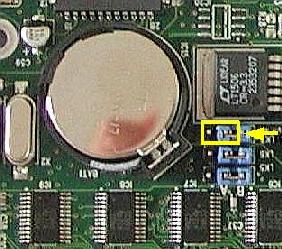
Look inside you will see a round silver thing that looks about the size of a 10p piece (quarter). This is the battery itself, carefully lift the retaining clip and slide the battery out. That’s it removed now go to your local computer retailer, electrical retailer (Tandy/Radio shack) taking the old battery with you and get a new battery.
Back to your computer insert the new battery by lifting the clip and sliding the battery in.
Reinstall your case and plug all the cables back (you did remember to label them didn’t you)
Now for the fun part.
You will now need to go into you bios….
Right the bios is the god of your computer.
To access it, when your computer first starts you will see a black screen with white text.
If you look carefully you will see a line that says something like "press del for setup" or some other key (F2 or ESC or tab) this will take you to god's house where you can make lots of changes to the way your machine works.
It is also the place where you can make your nice computer in to a rather expensive door stop so be careful and don’t go playing with anything.
You will now be presented with a blue screen with a lot of options on it,
The one we want is load optimised/default settings.
Press the F10 key and type y the computer should now reboot.
If every thing went well then your computer will now be up and running.
Shizers way: Keep computer running. Lay it on it's side and remove side cover to expose MoBo. Take any thin object, "small screwdriver, knife point, wood shiskabob skewer. Pull back the battery retaining clip. Toss the old battery in the junk recepticle, unless you belong to greenpeace and want to save the earth. Install the new battery. No need to reset bios becasue the compter supplies voltage to the cmos while it is running. Reset or resync clock with internet. Done!
written by unknown
23 Ways To Speed WinXP
Since defragging the disk won't do much to improve Windows XP performance, here are 23 suggestions that will. Each can enhance the performance and reliability of your customers' PCs. Best of all, most of them will cost you nothing.
1.) To decrease a system's boot time and increase system performance, use the money you save by not buying defragmentation software -- the built-in Windows defragmenter works just fine -- and instead equip the computer with an Ultra-133 or Serial ATA hard drive with 8-MB cache buffer.
2.) If a PC has less than 512 MB of RAM, add more memory. This is a relatively inexpensive and easy upgrade that can dramatically improve system performance.
3.) Ensure that Windows XP is utilizing the NTFS file system. If you're not sure, here's how to check: First, double-click the My Computer icon, right-click on the C: Drive, then select Properties. Next, examine the File System type; if it says FAT32, then back-up any important data. Next, click Start, click Run, type CMD, and then click OK. At the prompt, type CONVERT C: /FS:NTFS and press the Enter key. This process may take a while; it's important that the computer be uninterrupted and virus-free. The file system used by the bootable drive will be either FAT32 or NTFS. I highly recommend NTFS for its superior security, reliability, and efficiency with larger disk drives.
4.) Disable file indexing. The indexing service extracts information from documents and other files on the hard drive and creates a "searchable keyword index." As you can imagine, this process can be quite taxing on any system.
The idea is that the user can search for a word, phrase, or property inside a document, should they have hundreds or thousands of documents and not know the file name of the document they want. Windows XP's built-in search functionality can still perform these kinds of searches without the Indexing service. It just takes longer. The OS has to open each file at the time of the request to help find what the user is looking for.
10 Fast and Free Security Enhancements
1. Check Windows Update and Office Update regularly (_http://office.microsoft.com/productupdates); have your Office CD ready. Windows Me, 2000, and XP users can configure automatic updates. Click on the Automatic Updates tab in the System control panel and choose the appropriate options.
2. Install a personal firewall. Both SyGate (_www.sygate.com) and ZoneAlarm (_www.zonelabs.com) offer free versions.
10 reasons why PCs crash you must Know
Fatal error: the system has become unstable or is busy," it says. "Enter to return to Windows or press Control-Alt-Delete to restart your computer. If you do this you will lose any unsaved information in all open applications."
You have just been struck by the Blue Screen of Death. Anyone who uses Mcft Windows will be familiar with this. What can you do? More importantly, how can you prevent it happening?
1 Hardware conflict
The number one reason why Windows crashes is hardware conflict. Each hardware device communicates to other devices through an interrupt request channel (IRQ). These are supposed to be unique for each device.
For example, a printer usually connects internally on IRQ 7. The keyboard usually uses IRQ 1 and the floppy disk drive IRQ 6. Each device will try to hog a single IRQ for itself.
If there are a lot of devices, or if they are not installed properly, two of them may end up sharing the same IRQ number. When the user tries to use both devices at the same time, a crash can happen. The way to check if your computer has a hardware conflict is through the following route:
* Start-Settings-Control Panel-System-Device Manager.
Often if a device has a problem a yellow '!' appears next to its description in the Device Manager. Highlight Computer (in the Device Manager) and press Properties to see the IRQ numbers used by your computer. If the IRQ number appears twice, two devices may be using it.
Sometimes a device might share an IRQ with something described as 'IRQ holder for PCI steering'. This can be ignored. The best way to fix this problem is to remove the problem device and reinstall it.
Sometimes you may have to find more recent drivers on the internet to make the device function properly. A good resource is www.driverguide.com. If the device is a soundcard, or a modem, it can often be fixed by moving it to a different slot on the motherboard (be careful about opening your computer, as you may void the warranty).
When working inside a computer you should switch it off, unplug the mains lead and touch an unpainted metal surface to discharge any static electricity.
To be fair to Mcft, the problem with IRQ numbers is not of its making. It is a legacy problem going back to the first PC designs using the IBM 8086 chip. Initially there were only eight IRQs. Today there are 16 IRQs in a PC. It is easy to run out of them. There are plans to increase the number of IRQs in future designs.
2 Bad Ram
Ram (random-access memory) problems might bring on the blue screen of death with a message saying Fatal Exception Error. A fatal error indicates a serious hardware problem. Sometimes it may mean a part is damaged and will need replacing.
But a fatal error caused by Ram might be caused by a mismatch of chips. For example, mixing 70-nanosecond (70ns) Ram with 60ns Ram will usually force the computer to run all the Ram at the slower speed. This will often crash the machine if the Ram is overworked.
One way around this problem is to enter the BIOS settings and increase the wait state of the Ram. This can make it more stable. Another way to troubleshoot a suspected Ram problem is to rearrange the Ram chips on the motherboard, or take some of them out. Then try to repeat the circumstances that caused the crash. When handling Ram try not to touch the gold connections, as they can be easily damaged.
Parity error messages also refer to Ram. Modern Ram chips are either parity (ECC) or non parity (non-ECC). It is best not to mix the two types, as this can be a cause of trouble.
EMM386 error messages refer to memory problems but may not be connected to bad Ram. This may be due to free memory problems often linked to old Dos-based programmes.
3 BIOS settings
Every motherboard is supplied with a range of chipset settings that are decided in the factory. A common way to access these settings is to press the F2 or delete button during the first few seconds of a boot-up.
Once inside the BIOS, great care should be taken. It is a good idea to write down on a piece of paper all the settings that appear on the screen. That way, if you change something and the computer becomes more unstable, you will know what settings to revert to.
A common BIOS error concerns the CAS latency. This refers to the Ram. Older EDO (extended data out) Ram has a CAS latency of 3. Newer SDRam has a CAS latency of 2. Setting the wrong figure can cause the Ram to lock up and freeze the computer's display.
Mcft Windows is better at allocating IRQ numbers than any BIOS. If possible set the IRQ numbers to Auto in the BIOS. This will allow Windows to allocate the IRQ numbers (make sure the BIOS setting for Plug and Play OS is switched to 'yes' to allow Windows to do this.).
Wednesday, January 16, 2013
ADF.LY the easiest
STEP 1
If you haven’t yet, sign up to Adf.ly at - Click “Join Now” and select “Link Shrinker” under Account Type
STEP 2
If you haven’t yet sign up a YouTube, sign up here: http://YouTube.com
STEP 3
Go to www.sweetslyrics.com and www.directlyrics.com and check out their latest music news. Very
often if not daily, a new song or mix tape is released from some very famous artists. Artists like Lady
Gaga, Eminem, 50 Cents, Chris Brown, Lil Wayne, Katy Perry and Britney Spears. The more famous the
artist the more money you make from this method.
Get as many new song names from these two sites as possible, you could also try Google’s News search
and search broad terms like, “new music” or “new song” – and pick up brand new song releases that
way too. Every little helps.
Now you should have a nice list of recently released hot of the press tracks to cash in on.
REMEMBER: The key to this method is speed, persistence and consistency. That’s all.
STEP 4
Running through the list of songs you’ve got now, head to YouTube and search to see if any of them
have already been uploaded, quite often the songs would have been but you will notice that they would
have uploaded quite recently giving you enough time to duplicate their video (download – use KeepVid)
and re-upload the song on your YouTube account. Trust me; you don’t have to be the first to rank no1
on YouTube search for anything... You just have to be the best. I will explain further. But first download
the videos, and if you’ve got a super fast PC, remember that time is of the essence, reproduce the video,
by adding instructions right at the beginning and end of the video suggesting to viewers that there are
goodies to be found in the description that they do not want to miss out on, you can do this in Movie
Maker really easily... This trick works really well and really explodes your earnings. Trust me on this one.
I recommend you reproduce as I just suggested but if you can’t or your PC moves at a turtle pace then
leave off the suggestion, why?, you don’t want to pass up your opportunity to be in early. Not
necessarily first, but early! If God was to shine favour on you, you might even find you are indeed first to
the party and you get VIP treatment from YouTube.
STEP 5
Now your videos are up, you’ll find that they probably don’t show up for a while. Not to worry, this is
common – there is often a gap between a video being uploaded and it hitting the YouTube search pages.
But despite knowing this, you mustn’t rest on your laurels!
In fact besides being early to the party, this is the most important bit.
If you are going to make a killing with this method, your video has got to rank high enough on the most
popular search term for your song! Let me help you with that.
The first step to achieving popularity for your video is titling your video extremely similar if not exactly
the same as the most popular search term, and by title I mean the actual title of your YouTube video!
Not some title you add to your movie file when publishing it in Movie Maker. Ok, so let’s say you
uploaded a Lil Wayne track titled – “That’s what they call me”. Fittingly you should title your video – “Lil
Wayne – That’s what they call me [2011 NEW SONG]” or something along those lines! The most popular
search term is included – “Lil wayne that’s what they call me”, and the “[2011 NEW SONG]” bit makes
your video stand out from the others that might employ your strategy too. What you fit into those
braces could spell dessert or disaster so choose appropriately.
Oh yeah, and pop a few relevant tags in there... don’t think they hold much weight though as I see
videos rank top even without any tags but you never see that happen without an appropriate title. So
pick your priorities right.
STEP 6
The next step to making sure your video spearheads straight to the top of YouTube search, or close
enough to bank hard on adf.ly, is actually really simple.
Using the tricks I am teaching on YouTube I have had videos hit anywhere from 60,000 views to over
2,000,000 views! And you can imagine, my take home was something special!
All you’ve got to do is ‘Like’ your video a few times... and you’re done.
Just kidding, liking wouldn’t hurt, but I seriously doubt it would affect rankings too much, seeing as it can
be gamed almost too easily. What you really need to do is get traffic to your video.
Post a link to your video on music forums like Digital Spy and Buzz Jack
Now I know what you’re thinking... “The whole point of half of these steps was to get traffic through
YouTube, but now I have to get traffic to YouTube first?” I know it sounds absurd but it’s true and it
makes plenty of sense. YouTube ranks your video based on its popularity and relevance and that is really
all that you must focus on. You’ve got the relevance, now you need the popularity. Now let me further
explain how YouTube reads this. If a video is uploaded and in its first few minutes it gets a consistent
stream of views, it doesn’t have to be an avalanche, it is considered popular and indeed very healthy.
And that is what we are looking for. In fact getting an avalanche that cannot be sustained beyond a few
minutes or hours will hinder your chances against other videos that have had a consistent growth at a
steady natural rate.
Somehow I know that made a lot of sense. So now for the final part, don’t worry I didn’t
STEP 7
So now YouTube has officially been dominated and the views start rolling in.
How do we go about making a bucket load on adfly?
But first remember when I said you should reproduce the video in software like Movie Maker, or
another one of your choice for that matter. That would have been a good move. Just sayin’
But if you didn’t you could always add annotations to your videos, using YouTube’s built in annotations
engine and you could get the job done that way, your choice, it’s more time efficient and editable
because you don’t have to do it before the video is uploaded, taking up a few valuable minutes and you
can always edit it later. However I do like doing it on video as that often makes people trust it more as it
almost acts as a verification that it’s your video and not someone else’s and if done neatly enough it can
push viewers to thinking it was part of the song. Imagine what that can do to your earnings.
Now back to Step 7.
You want the link to target something directly related to your artist. I suggest you pick something
everyone who comes across the video would want to see for themselves. It could be a shocking news
story, here’s one off the top of my head, in the case of Chris Brown, he always seems to accompany
song releases with controversial moments that are captured by video and that pays dividends. Link to
the news article! Maybe link to a YouTube related to the news article.
You could just search YouTube for a video attractive a lot of attention that relates to your artist and link
to that. Of course all links will be masked with adfly.
Now be careful about this. Link relevant and don’t try to defraud adfly because they have a deadly way
of finding stuff out. Luckily I didn’t learn that from personal experience.
NOTE: When linking, try not to use the default adfly URL, be different and less recognizable, use one of
their other redirect options like u.bb or 9.bb – VERY IMPORTANT
That is the beauty of Adfly. You can actually make money ethically! Take advantage of it.
If you haven’t yet, sign up to Adf.ly
by adrian
Top 10 Secrets to Selling Successfully on eBay
Recommended Money Making Opportunity:
The resource listed in this section has been helpful in building
hundreds of successful online auction businesses. Perhaps it can be
as helpful to you. For complete details on this offer visit:
* * * * * * * * * * * * * * * * * * * * * * * * * * * * * * * * * * * * * *
“Who Else Wants To Learn A Simple, Step-By-Step 'System'
For Making Quick and Easy Money Selling On eBay?”
Other leading auction sellers are Steaming Mad! Renowned eBay Power
Seller Jason James is finally revealing all his top product suppliers, all his
insider secrets, all his hot selling tips, and much more to help you make
BIG MONEY selling products on eBay!
As a successful Power Seller on eBay I often get turned to for advice. Since I
registered on eBay in 2000, I've ran thousands of profitable auctions which I
follow these guidelines. Most importantly always try to be fair with other users
who deal with you and never be intimidated by any competition. eBay is big
enough for us all, and currently there is 1 seller registered to 78 buyers.
1) Low starting Price
Before you list your auction, ask yourself what's the lowest amount you'd be
prepared to accept for your item. A low starting price will attract more bids and
at a quicker pace - usually within the first day of the listings. Research shows
that a .99c starting price will get you bidders within a few hours. Many vehicles
and high value items are sold with a low starting price especially by
established Power Sellers - because unless it's an extremely poor week the
item will normally end up with hundreds of bids and at a cost that's acceptable
to the seller.
Additionally users are more likely to view auctions which already have a
successful bid as it generates interest in your item. It's like if you see a market
stall with hundreds of people standing around it - your curiosity would tell you
to stop and see what's generating interest. Use curiosity to your advantage.
2) No Reserve
Many sellers still place reserve prices on their item. A reserve price is one
which unless it is met by your sellers you are not obliged to sell the item. An
example would be if you have an reserve of $10, and your item sells for $9.00
you do not have to complete the sale & release the item. Reserve items,
although very occasionally may be necessary in the case of extremely high
value items or businesses for sale are off putting to bidders. Why would you
bid on an item with a reserve price on, unless you already knew were aware of
what the reserve was. Personally I'd look for alternative items without a
reserve price.
eBay has already removed the Reserve Price option from some of it's site in a
move that is largely welcome by the majority of users. It could be a sign that
this policy change will be extended to all of it's sites.
3) Images
An Image is worth a thousand words. Take photos of your item to clearly show
the condition of it, and any damage or unusual aspects of it. eBay allows you
to include one photo free of charge and if you use your own image hosting
service you can easily include as many photos as necessary to show your
item in a detailed manner.
Many Power Sellers use up to 20 photos for one single item. Ask yourself how
many are necessary for your item, and also consider using the gallery option
so the image will appear within the search listings.
4) Cross-Promotion
You've worked hard to get users to view your listing, so while their viewing it
also include a link to any other items you've available. This is allowed in
addition to the already provided link to "View other sellers’ items". You can use
commercial services (such as Anadale) to include images and descriptions of
your other items.
5) About Me Page
Sell yourself on your About Me Page. This is your chance to establish some
credibility for yourself. The biggest reason people will not buy from you online
is because you have failed to establish any credibility for yourself. So include
details about you and your business. Where are you situated?, how long have
you been registered on eBay?, What do you specialize in? If your a high
volume seller you may also want to include a photo of yourself. Have a look at
other About Me pages to see what works and what doesn't.
6) Return Policy
Nothing gives buyers greater confidence than knowing that they can return the
product if it's not for them. So consider drafting yourself a returns policy.
Will you accept returns? What if the item arrives faulty? How long is the policy
valid for?
It may seem like a big risk to offer such a policy knowing that you'll have to
incur a cost relisting and reshipping items but only a very small amount of
users will return the items.
7) Feedback
Leave feedback for the winning bidder as soon as the item is paid for. Some
sellers like to protect themselves by only returning feedback when it is left for
you. I consider this unprofessional and your bidders will most likely think the
same too. Don't be scared of getting a negative or neutral comment on your
feedback record. The majority of users will consider all of you feedback before
bidding, not just looking at one or two comments.
Additionally if you deserve any feedback left for you such as if you were late
shipping, accept it was you fault. Don't be too worried about admitting it with
an apology in response to your feedback. You may also want to compensate
your winning bidder with reduced postage or a bonus item to show it was a
genuine error on your part.
If you know the there is going to be a delay in completing any transaction,
email the bidder and inform them. Apologize with a comment such as "This is
a rare incident that's completely out of my control. I hope by looking at my
feedback record you will see this is an completely isolated incident". Always
try to keep on good terms with all your buyers.
8) Instant attention
Give immediate attention to your bidders and prospective bidders. Don't leave
a delay of days before responding to any emails or phone calls. And following
a successful transaction you may want to email your bidder to tell them when
the item has been shipped and when it will be expected to arrive.
I know many sellers, some of them Power Sellers who takes days to respond
to a simple email. If you don't have time to respond immediately consider
delegating the responsibility to someone else who can respond on your behalf.
Never give any bidder reason to doubt whether you’re a genuine seller or not.
9) eBay Store
Opening an eBay Store is a necessary step for anyone medium sized seller.
Not only do you benefit from cheaper and longer listings within your shop, but
you can also cross-promote your products easily, send out newsletters and
establish a trusted brand for your listings easier. Also you'll gain more
coverage (and hopefully bids) for your listings by appearing in the eBay store
directory.
10) Shipping
Don't be tempted to over price your shipping costs and try to make a small
profit on this. Firstly you can be found out to easily, and it's one of the most
unforgiving things for a seller to do. More importantly over pricing your
shipping costs is against eBay policy.
If you’re offering digital goods such as an eBook or special report, you may
consider a small handling fee to cover your time and administration costs. If
you do make sure it's fair and clearly highlighted within the item listing. The
last thing a bidder wants to do is find out there are unexpected costs
associated with a purchase they've made.
This Brought to You by: Hannes Johnson
http://www.auctionresourcenetwork.com
Subscribe to:
Posts (Atom)